Closed beta
Less lag in online games
WinLag measures the server you play on and sends the game's traffic the fastest way: through our node, or direct when that is faster.
Windows 10 and 11, 64-bit. Sign in with Steam or Discord; signing in needs an invite code. Until the app is digitally signed, Windows may show a warning when you install it.
How the route is chosen
directvia node
Both paths to your match's server are measured. The game takes the faster one.
How it works
Three steps to your match
- 01
Install and sign in
Sign in with Steam or Discord and enter your invite code. The app needs administrator rights: without them Windows will not let it create a network adapter and routes.
- 02
Press Boost before you join
Pick the game, turn on Boost, then join a server. A live match is not moved, because that would drop you from the game: leave and join again.
- 03
Watch the numbers
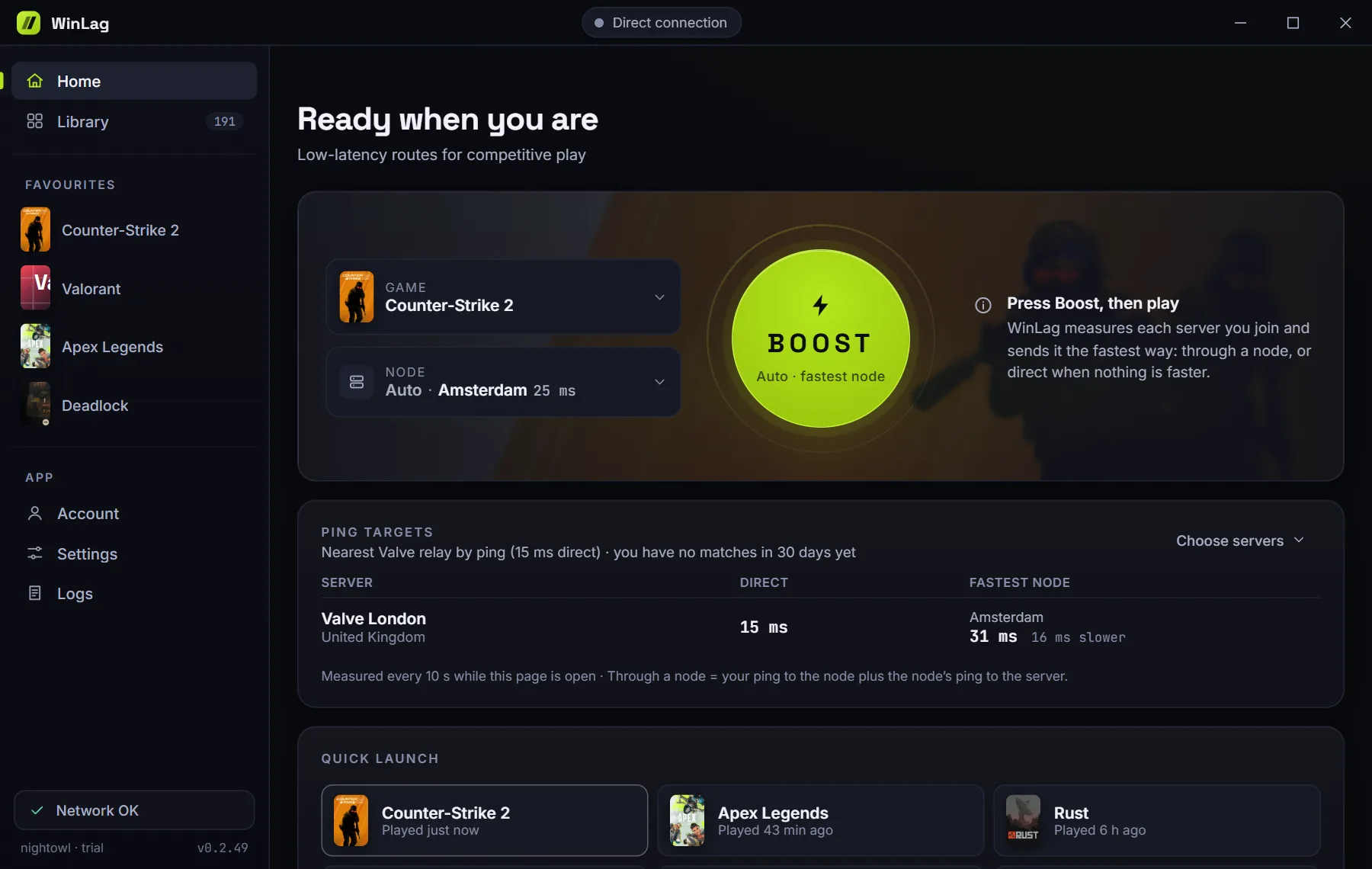
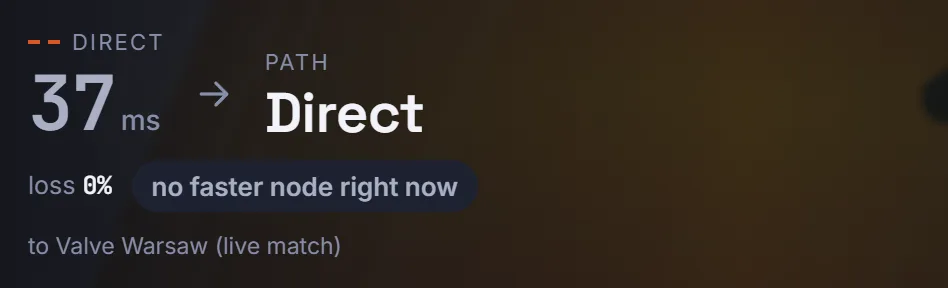
The app shows your ping direct and via the node, packet loss and the route in use. If no node is faster, the game goes direct, and the app says so.
The app
What WinLag looks like
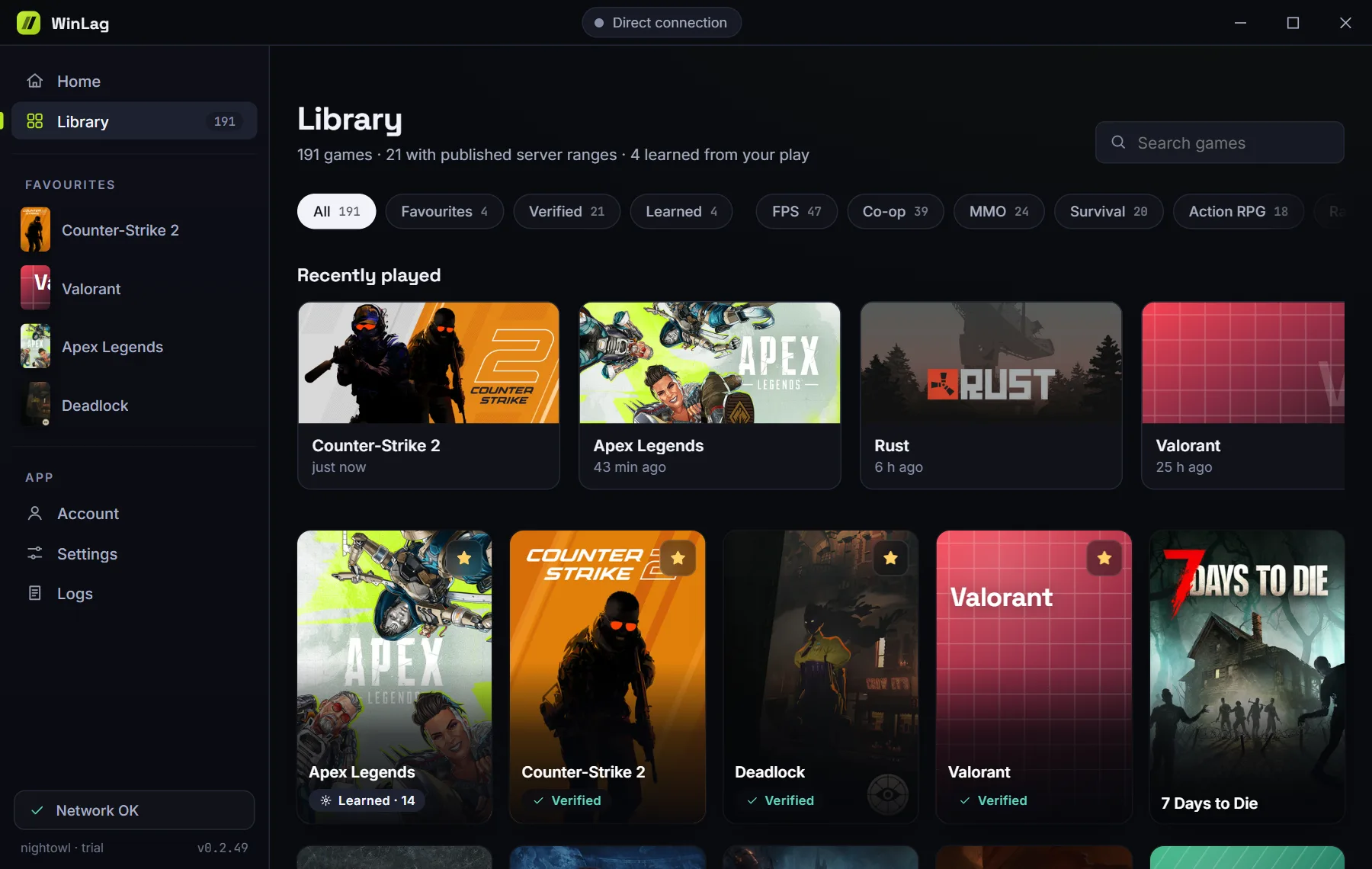
This is the real interface with demo data. The cities and numbers here are examples; yours will differ.
The app does not flatter itself
If your normal connection beats every node, that is what you will see.
What's inside
A network tool that stays out of the game
What it does
- Sends only the server addresses of the game you choose through a node, over an encrypted tunnel.
- Leaves your browser, downloads and other apps on your normal connection, unless you turn on the separate browser boost yourself.
- Knows a game is running from the names in the Windows process list, like Task Manager.
- Uses the Wintun network adapter from the authors of WireGuard for the tunnel.
What it does not do
- Does not open the game process or read its memory.
- Injects and hooks nothing: no libraries, no keyboard, no mouse.
- Does not change game files, game settings or the content of packets.
- Does not hide its code behind packers or obfuscators.
This describes how the app works. It is not permission from any game. The rules of games, tournaments and platforms are set by their owners and can change. We cannot guarantee that a given game or platform will allow routing through a third-party server. See the terms.
Games
More than 180 games in the catalog
Shooters, MMOs, survival, racing and roleplay projects. Some of the list:
- Counter-Strike 2
- Dota 2
- Valorant
- League of Legends
- Rust
- Apex Legends
- PUBG: Battlegrounds
- Escape from Tarkov
- Fortnite
- World of Tanks
- War Thunder
- World of Warcraft
- Lost Ark
- Arizona RP
- Majestic RP
- GTA5RP
- Radmir RP
- Minecraft
- Roblox
- Marvel Rivals
- Overwatch
- Deadlock
- Delta Force
- Rainbow Six Siege
- ARC Raiders
- Genshin Impact
Servers already known
For some games, such as Counter-Strike 2, Dota 2, Valorant, League of Legends and Arizona RP, the catalog already lists the servers. Boost works from the first match.
Servers to learn
For the rest, the first session stays direct: WinLag notes the servers from the game's own traffic and boosts from the next match.
The full list of games
Shooters
- ARC Raiders
- Arena Breakout: Infinite
- Arma 3
- Arma Reforger
- BattleBit Remastered
- Battlefield 1
- Battlefield 2042
- Battlefield 4
- Battlefield 6
- Battlefield V
- Call of Duty
- Counter-Strike 2
- Delta Force
- Destiny 2
- Enlisted
- Escape from Tarkov
- Gray Zone Warfare
- Halo Infinite
- Halo: The Master Chief Collection
- Hell Let Loose
- Hunt: Showdown 1896
- Insurgency: Sandstorm
- Marvel Rivals
- Overwatch
- Paladins
- Rainbow Six Siege
- Splitgate
- Squad
- Team Fortress 2
- The Finals
- Valorant
- WARDOGS
Battle royale
- Apex Legends
- Fortnite
- Naraka: Bladepoint
- PUBG: Battlegrounds
MOBA
- Deadlock
- Dota 2
- League of Legends
- Smite 2
MMO
- AION 2
- Albion Online
- Black Desert
- EVE Online
- Final Fantasy XIV Online
- Guild Wars 2
- Lost Ark
- MapleStory
- Neverwinter
- New World: Aeternum
- Old School RuneScape
- Phantasy Star Online 2 New Genesis
- RuneScape
- Star Citizen
- Star Trek Online
- Star Wars: The Old Republic
- The Elder Scrolls Online
- The Lord of the Rings Online
- Throne and Liberty
- Tower of Fantasy
- World of Warcraft
- World of Warcraft Classic
Roleplay
- Amazing Online
- Arizona RP
- GTA5RP
- Majestic RP
- Radmir RP
Survival
- 7 Days to Die
- ARK: Survival Ascended
- ARK: Survival Evolved
- Conan Exiles
- Core Keeper
- DayZ
- Don't Starve Together
- Dune: Awakening
- Enshrouded
- Grounded
- Once Human
- Palworld
- Project Zomboid
- Raft
- Rust
- Sons Of The Forest
- The Forest
- Unturned
- V Rising
- Valheim
Action RPG
- Diablo II: Resurrected
- Diablo IV
- Elden Ring
- Genshin Impact
- Honkai: Star Rail
- Last Epoch
- Path of Exile
- Path of Exile 2
- Torchlight: Infinite
- Wuthering Waves
- Zenless Zone Zero
Co-op
- Back 4 Blood
- Baldur's Gate 3
- Bloons TD 6
- Content Warning
- Dead by Daylight
- Deep Rock Galactic
- Elden Ring Nightreign
- Farming Simulator 25
- GTFO
- Helldivers 2
- It Takes Two
- Killing Floor 2
- Left 4 Dead 2
- Lethal Company
- Monster Hunter Rise
- Monster Hunter Wilds
- Monster Hunter: World
- PAYDAY 2
- PAYDAY 3
- PEAK
- Phasmophobia
- R.E.P.O.
- Ready or Not
- Remnant II
- Risk of Rain 2
- Satisfactory
- Sea of Thieves
- Split Fiction
- Stardew Valley
- The Outlast Trials
- Tom Clancy's The Division 2
- Warframe
- Warhammer 40,000: Darktide
- Warhammer 40,000: Space Marine 2
- Warhammer: Vermintide 2
- World War Z
Strategy
- Age of Empires II: Definitive Edition
- Age of Empires IV
- Company of Heroes 3
- Hearts of Iron IV
- Mount & Blade II: Bannerlord
- StarCraft II
- Total War: Warhammer III
Racing and driving
- Assetto Corsa
- Euro Truck Simulator 2
- F1 25
- Forza Horizon 5
- Forza Horizon 6
- iRacing
- The Crew Motorfest
- Trackmania
Sports
- EA Sports FC 26
- EA Sports FC 27
- eFootball
- NBA 2K26
- Rocket League
Fighting
- Brawlhalla
- Chivalry 2
- Dragon Ball FighterZ
- For Honor
- Guilty Gear -Strive-
- MORDHAU
- Mortal Kombat 1
- Street Fighter 6
- Tekken 8
Vehicle combat
- Crossout
- War Thunder
- World of Tanks
- World of Warships
Sandbox
- Garry's Mod
- Grand Theft Auto V Enhanced
- Grand Theft Auto V Legacy
- Minecraft
- Red Dead Redemption 2
- Roblox
- Terraria
Social
- VRChat
Party
- Among Us
- Fall Guys
- Gang Beasts
- Golf With Your Friends
- Human Fall Flat
- Overcooked! 2
- Pummel Party
- Stumble Guys
FAQ
The short answers
How does WinLag work?
WinLag measures the server you play on and compares the route through our node with your direct connection. Game traffic goes whichever way is faster.
Can I get banned for this?
WinLag stays out of the game: it does not change game files, read game memory or inject anything. It only works with the network route. The rules of games and platforms are set by their owners.
Will all my internet go through your server?
No. Only the server addresses of the game you choose go through a node, and your browser and other apps work as usual.
Test it on your own connection
The measurement shows whether there is a gain for you.
Download for WindowsClosed beta: signing in needs an invite code. By installing WinLag, you accept the terms of use.